
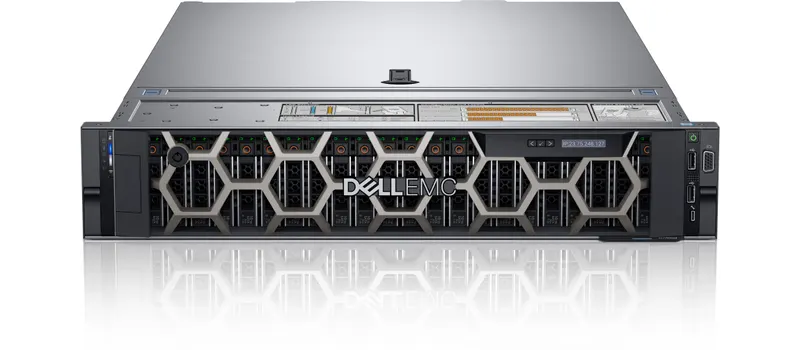
The Dell PowerEdge R620, R630, R640, R730 and R740 are among the most widely deployed rack servers in offices and data centres. They are also the models buyers ask us about most, both new-generation replacements and refurbished units. On paper they look similar. In practice they belong to three different hardware generations, and that difference affects performance, memory, operating system support and how long the server will stay useful.
This guide explains how to read Dell's model names, compares the five models side by side, and matches each one to real business workloads.
How to read Dell PowerEdge model names
Dell's naming for these generations follows a simple pattern:
- R means rack server. (T is tower, for example the T440 and T640.)
- The first digit is the class. A 6 is a 1U, two-socket server. A 7 is a 2U, two-socket server with more room for drives and expansion cards.
- The second digit is the generation: 2 = 12th generation, 3 = 13th generation, 4 = 14th generation. Newer models such as the R650/R750 (15th) and R660/R760 (16th) continue the pattern.
So the R640 and R740 are siblings from the same generation. The R640 is the compact 1U version and the R740 is the larger 2U version.
Side-by-side comparison
The table below summarises the main platform differences. Exact options vary by configuration, so always confirm the specific build you are buying.
| Model | Generation | Size | Processor family | Memory type | Remote management |
|---|---|---|---|---|---|
| R620 | 12th | 1U | Intel Xeon E5-2600 / E5-2600 v2 | DDR3 | iDRAC7 |
| R630 | 13th | 1U | Intel Xeon E5-2600 v3 / v4 | DDR4 | iDRAC8 |
| R730 | 13th | 2U | Intel Xeon E5-2600 v3 / v4 | DDR4 | iDRAC8 |
| R640 | 14th | 1U | Intel Xeon Scalable (1st and 2nd gen) | DDR4 | iDRAC9 |
| R740 | 14th | 2U | Intel Xeon Scalable (1st and 2nd gen) | DDR4 | iDRAC9 |
All five are dual-socket servers with 24 memory slots, redundant power supply options and hardware RAID controllers from Dell's PERC range.
Generation matters more than the model number
12th generation: R620
The R620 uses older Xeon E5 processors and DDR3 memory. It still runs light workloads well, but it is the oldest platform here. Power use per unit of work is higher, DDR3 upgrades are a dead end, and newer operating systems may not be officially supported. It makes sense mainly as a low-cost lab server, a test machine or a like-for-like spare for an existing R620 estate.
13th generation: R630 and R730
The 13th generation moved to DDR4 and Xeon E5 v3/v4 processors, a noticeable step up in memory bandwidth and efficiency. These models were extremely popular, so parts are widely available. They suit file servers, domain controllers, application servers and moderate virtualisation, especially on a tight budget.
14th generation: R640 and R740
The 14th generation introduced Intel Xeon Scalable processors, more memory channels per processor, and iDRAC9. For most businesses buying today, the R640 and R740 are the sweet spot: modern enough for current workloads and virtualisation, and widely available as refurbished units.
Operating system support: newer versions of Windows Server and VMware ESXi are certified for specific server generations and components. Before you buy, check the operating system support information for the exact model on Dell Support. Older generations are less likely to be supported by the latest releases.
1U or 2U: R6x0 vs R7x0
Choosing between the R640 and R740 (or the R630 and R730) is mostly about physical space inside the server.
| Factor | 1U (R620 / R630 / R640) | 2U (R730 / R740) |
|---|---|---|
| Rack space | Compact, saves rack units | Takes twice the height |
| Drive bays | Fewer bays, mainly 2.5-inch | More bays, with 3.5-inch options for high capacity |
| Expansion slots | Limited PCIe slots | More PCIe slots, room for GPUs or extra network cards in suitable configurations |
| Cooling and noise | Smaller fans, can be louder under load | Larger chassis, generally easier to cool |
| Typical role | Compute, web, application, domain controller | Storage-heavy, virtualisation hosts, databases, backup targets |
If you need lots of local storage or plan to add cards later, choose the 2U model. If rack space is tight and storage needs are modest, the 1U model is efficient.
Which model for which workload?
| Workload | Good fit | Why |
|---|---|---|
| Domain controller, DNS, DHCP, print server | R630, R640 | Light workload, compact 1U is enough |
| File server for a small or mid-sized office | R730, R740 | More drive bays for capacity and RAID |
| Tally, ERP or accounting server with Remote Desktop users | R640, R740 | Modern CPUs and memory bandwidth for many sessions |
| Virtualisation host (Hyper-V, VMware, Proxmox) | R740 (or R640 for compute-only hosts) | More memory, more drives, room to grow |
| Backup repository | R730, R740 with 3.5-inch drives | High-capacity drives at lower cost per TB |
| Test, lab or training | R620, R630 | Lowest cost; performance is less critical |
Real-world examples
Example 1: an accounting firm moving Tally to a server
A firm with a dozen accounts staff wants Tally on a central server, accessed over Remote Desktop, with daily backups. An R640 with SSDs in RAID 1 or RAID 10, enough memory for the concurrent sessions, and Windows Server with RDS CALs is a strong fit. The 1U size fits a small wall-mount or floor rack. See our guide to setting up Tally for multiple users and our checklist for IT support in CA and accounting offices.
Example 2: a design studio that needs storage and VMs
A studio wants a few virtual machines plus a large shared file area. An R740 gives space for SSDs for the VMs and large-capacity drives for files, with room to add memory later.
Example 3: a budget lab
An IT team needs a server to test updates and migrations. A refurbished R630 keeps cost low and uses the same DDR4 generation as many production servers.
New or refurbished?
All five models in this guide are previous generations, so most buyers today get them as refurbished units. That can be excellent value, provided the condition and warranty are clear. For workloads that need to run for many years, consider a current-generation model such as the R750 or R760 instead. Our article on refurbished vs new Dell servers covers the trade-offs and a buying checklist.
What to check before you buy
- Processors: exact model and number. Core count affects both performance and Windows Server licensing, which is licensed per core.
- Memory: total size, module size and type, and free slots for upgrades. See our PowerEdge RAM upgrade guide.
- RAID controller: model, cache and battery. A controller with cache matters for write performance.
- Drive bays and drives: 2.5-inch or 3.5-inch, how many, and whether drives and caddies are included.
- Power supplies: two PSUs for redundancy.
- iDRAC licence level: Enterprise gives full remote console access.
- Rails and bezel for rack mounting.
- Warranty terms in writing and a GST invoice.
Upgrades that extend a server's life
Many PowerEdge servers are retired early when a simple upgrade would have done the job:
- Replace hard disks with SSDs for the operating system and active data. This is often the single biggest improvement. See SSD vs HDD for business.
- Add memory for more virtual machines or Remote Desktop users.
- Upgrade processors within the same generation, where the platform supports it.
- Update firmware (BIOS, iDRAC, RAID controller) before deploying.
Our recommendation
- Best overall value today: R640 (1U) or R740 (2U).
- Tight budget, moderate workload: R630 or R730.
- Lab, test or spares only: R620.
- Five-plus-year critical workload: consider a current-generation R750 or R760.
If you are not sure which model fits, share your workload, number of users and storage needs. We will suggest a configuration and quote it, with condition and warranty terms stated for refurbished units.
Practical tips for running these servers
Update firmware before production
Refurbished or long-stored servers often have old BIOS, iDRAC and RAID controller firmware. Update them using Dell's Lifecycle Controller or update packages before installing the operating system. This fixes known bugs and improves compatibility with newer drives and operating systems.
Plan for noise and heat
Rack servers are designed for server rooms. Under load, fans in 1U models in particular can be loud. If the server will sit in an office, consider a tower model such as the T440 or T640, or a ventilated rack in a separate room.
Set up iDRAC alerts on day one
Configure iDRAC with a static IP on a management network, change the default password, and enable email alerts for drive, power supply, fan and temperature events. A failing drive reported immediately is a five-minute fix; one discovered weeks later can mean data loss.
Keep spares for critical servers
A spare drive in the same model and size, and ideally a spare power supply, lets you recover from the most common hardware failures within minutes.
Products and services for this
- Dell PowerEdge servers, new and refurbished
- Server RAM, SSDs and SAS drives
- Windows Server licences and CALs
- Server installation, configuration and support
Quick answers
What is the difference between the Dell R640 and R740? +
They are the same 14th generation with the same processor family. The R640 is a compact 1U server; the R740 is 2U with more drive bays and expansion slots.
Is the Dell R630 still worth buying? +
For moderate workloads on a budget, yes. It uses DDR4 memory and Xeon E5 v3/v4 processors. Check that your planned operating system supports it.
Which is better, the R730 or the R740? +
The R740 is a generation newer, with Xeon Scalable processors, more memory channels and iDRAC9. The R730 is cheaper and still capable for file serving and moderate virtualisation.
Does the Dell R620 support DDR4 memory? +
No. The R620 is a 12th generation server and uses DDR3 memory.
Can I run Windows Server 2025 on an R640 or R740? +
Check Dell’s operating system support information for the exact model and components before installing. Support depends on the server generation and hardware such as the RAID controller.
Should I buy a 1U or 2U server? +
Choose 1U when rack space is tight and storage needs are small. Choose 2U when you need more drives, expansion cards or room to grow.
Need help choosing a PowerEdge model? We supply new and refurbished Dell servers across India, with condition and warranty terms stated in each quote.