"Do we need a server, or will a NAS do?" is one of the most common questions small and mid-sized businesses ask. Both can share files across the office, both use RAID, and both sit in the comms cupboard. But they are designed for different jobs, and choosing the wrong one leads to either wasted money or a system that cannot do what you need.
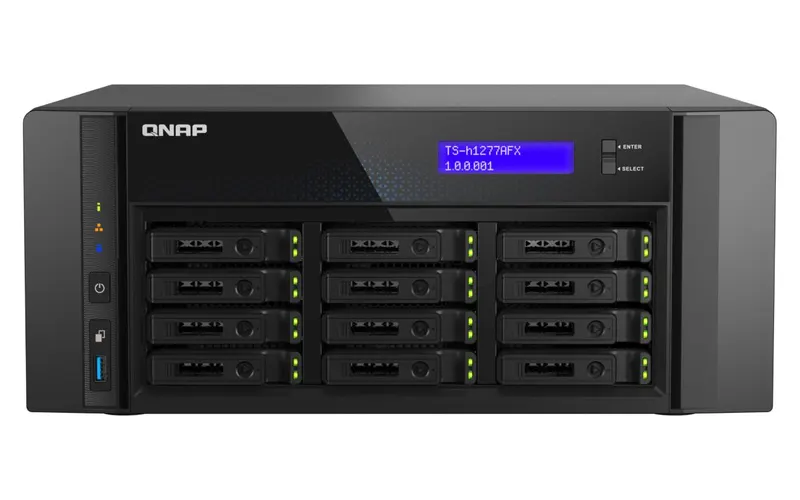
In this article, a dedicated server means a physical server in your office or data centre, such as a Dell PowerEdge running Windows Server or Linux. A NAS means a purpose-built storage appliance such as a Synology or QNAP.
What a NAS is designed for
A NAS is a storage appliance with its own operating system (Synology DSM, QNAP QTS). It is built to:
- Share files and folders with permissions
- Back up PCs, servers and cloud accounts
- Take snapshots and replicate data off-site
- Provide remote file access and sync
- Record CCTV and run light apps or containers
It is managed through a web interface, uses little power, and is generally quick to set up. See Synology DSM and QNAP QTS for what each platform includes.
What a server is designed for
A server is a general-purpose computer built for reliability. It runs a full operating system and can run almost any business software:
- Active Directory for central user accounts, group policies and single sign-on
- Business applications: Tally, ERP, CRM, SQL Server databases
- Remote Desktop Services for users who work on the server
- Virtualisation: many virtual machines on one host
- Specialised software that will only run on Windows Server or Linux
Side-by-side comparison
| Factor | NAS | Dedicated server |
|---|---|---|
| Main purpose | Storage, sharing, backup | Applications, directory services, virtualisation |
| Upfront cost | Generally lower | Generally higher, plus OS licences |
| Software licences | OS included | Windows Server cores, CALs, RDS CALs if needed |
| Running business applications | Limited to supported apps and containers | Runs almost any server software |
| Active Directory | Can join a domain; limited directory features | Full Active Directory domain controller |
| Performance | Excellent for file serving; limited CPU for heavy apps | Scales with processors, RAM and SSDs |
| Backup features | Strong built-in tools | Needs backup software and a backup target |
| Management | Simple web interface | Needs Windows Server or Linux skills |
| Power use and noise | Low | Higher |
| Hardware redundancy | Dual PSU on higher-end models | Dual PSU, hot-swap parts, remote management (iDRAC) |
When a NAS is the better choice
- Your main need is shared folders and backups.
- Your software is cloud-based (for example Microsoft 365 or Google Workspace, or a cloud ERP), so nothing needs to run on-site.
- You do not need Active Directory, or you manage users in the cloud.
- There is no dedicated IT person and you want simple management.
- You need a backup target for an existing server.
When a server is the better choice
- You need Active Directory to manage users, PCs and policies centrally.
- You run Tally, ERP or database applications on-premises with multiple users.
- Staff or branches connect through Remote Desktop to work on applications.
- You want to run several workloads as virtual machines on one machine.
- Your software vendor requires Windows Server or a specific Linux distribution.
The common answer: both
For many businesses, the best design uses both devices, each for what it does best:
- The server runs Active Directory, applications and virtual machines.
- The NAS backs up the server and PCs, keeps snapshots, and sends an off-site copy.
This also follows good backup practice: your backups are on a separate device, so a server failure does not take the backups with it. See why every business needs a NAS backup solution.
Real-world examples
A 10-person marketing agency
Email and documents live in Google Workspace, with design files stored locally. A 4-bay NAS with shared folders, snapshots and cloud backup meets every need. A server would add cost and complexity without any benefit.
A 30-person trading company
Tally and an inventory application must run on-site for multiple users, including two branch offices. A server running Windows Server with Remote Desktop Services hosts the applications; a NAS backs up the server nightly and copies data off-site.
A manufacturing unit with a CCTV system
The unit needs a domain, an ERP server, and long-term CCTV storage. A virtualisation host runs the domain controller and ERP as virtual machines, and a separate NAS stores CCTV recordings and backups.
Cost: look at the whole picture
When comparing cost, include more than the hardware price:
- Licences: Windows Server cores, CALs and RDS CALs for a server; usually none for a NAS's own OS.
- Drives: both need drives; enterprise SSDs for application servers cost more.
- Power and cooling: servers draw more power.
- Management time: servers need more expertise to maintain.
- Downtime risk: what it costs the business if the device fails.
Can a NAS replace a Windows file server?
For file sharing alone, often yes. A NAS can join an existing Active Directory domain and apply the same user and group permissions to shared folders. What it cannot replace is a domain controller with full Group Policy, or applications that need Windows Server.
Can a server replace a NAS?
A server can share files and store backups, but keeping backups on the same server as your data is risky. If you have a server, use a separate NAS or backup device.
How to decide in five questions
- Do you run any business application on-site that multiple users access?
- Do you need central user and PC management with Active Directory?
- Do you want to run several workloads as virtual machines?
- Where will your backups be stored?
- Who will maintain the system?
If you answered "yes" to 1, 2 or 3, you need a server, and most likely a NAS for backup. If you answered "no" to all three, a NAS alone is likely enough.
Performance considerations
For file sharing, a well-specified NAS with enough drives and a fast network connection performs very well. Performance limits usually come from:
- Network speed: a single gigabit port is shared by all users; 10GbE helps with large files.
- Drive type: hard disks handle large files well but struggle with many small random reads; SSD caching helps.
- CPU and memory: entry NAS models have modest processors, which limits heavy apps, encryption and many simultaneous backups.
Servers scale further: more cores, much more memory, enterprise SSDs and hardware RAID controllers. That is why databases, virtual machines and Remote Desktop workloads belong on a server.
Security and access control
Both devices support user accounts, permissions and encryption. On a server, Active Directory and Group Policy give fine-grained control over users and PCs. A NAS can use Active Directory accounts for its shares, which keeps permissions consistent. Whichever you use, never expose management interfaces to the internet, and apply updates regularly.
Middle-ground options
- NAS with virtual machines: some higher-end Synology and QNAP models can run a few light VMs or containers. This suits small utilities, but not demanding business applications.
- Cloud plus NAS: businesses using cloud email and software often need only a NAS on-site for files and backups.
- Virtualised server with NAS backup: one server running several VMs, backed up to a NAS, is the most common design for growing offices.
- Refurbished server: when a server is needed but budget is tight, a refurbished Dell PowerEdge from a recent generation can close the cost gap.
The right answer depends on your applications, users and growth plans. See how to choose a server for your business for sizing guidance.
Our view
For most growing businesses, the question is not server or NAS but what each should do. Put applications on a server and backups on a NAS, and you get performance and protection without overspending.
Products and services for this
- Synology NAS and QNAP NAS
- Dell PowerEdge servers
- Windows Server licences and CALs
- Server setup and NAS setup and backup
Quick answers
What is the difference between a NAS and a server? +
A NAS is a storage appliance built for file sharing and backup. A server is a general-purpose computer that runs Active Directory, business applications, databases and virtual machines.
Can a NAS replace a file server? +
For file sharing, often yes. A NAS can join an Active Directory domain and use the same permissions. It cannot replace a domain controller or Windows-only applications.
Is a NAS cheaper than a server? +
Usually, yes. A NAS generally costs less up front, includes its own operating system and uses less power. A server also needs Windows Server licences and CALs.
Can I run Tally on a NAS? +
Tally data can be stored on a NAS share, but Tally itself runs on Windows PCs or a Windows server. For Remote Desktop access to Tally, you need a Windows Server.
Should backups be stored on the same server? +
No. Store backups on a separate device such as a NAS, plus an off-site copy, so one failure cannot destroy both the data and its backup.
Do I need both a server and a NAS? +
Many businesses do: a server for applications and a NAS for backups and file storage.
Not sure whether you need a server, a NAS or both? Tell us how your office works and we will recommend the right setup.